
PM2 is a process manager for Node.js applications that allows you to manage, monitor, and maintain applications in production.
Typically, when we develop Node.js applications, we run them directly with:
node app.js
But this has several problems in production. For example, if the application crashes it won’t restart, we don’t have an easy way to monitor its status, etc.
PM2 solves all these problems by providing:
- Auto-restart of applications when they fail
- Real-time monitoring and logs
- Load balancing between multiple instances
AGPLv3 License Notice: PM2 is distributed under the AGPLv3 license (GNU Affero General Public License). Potential obligations could arise if:
- You deeply integrate PM2 into your application (creating a derivative work)
- You offer PM2 as a public SaaS service (would require releasing modifications)
Installing PM2
To use PM2, we install it globally using NPM:
npm install -g pm2
Now we can verify it was installed correctly by doing:
pm2 —version
Basic Usage of PM2
Starting an Application
The basic command to start an application with PM2 is:
pm2 start app.js
We can also specify a name for the application:
pm2 start app.js —name “mi-api”
PM2 automatically daemonizes the process (runs it in the background)
Essential Commands
Here is a list of the main commands available in PM2.
| Command | Description |
|---|---|
pm2 list | Lists all managed applications |
| `pm2 show <id | name>` |
| `pm2 stop <id | name>` |
| `pm2 restart <id | name>` |
| `pm2 delete <id | name>` |
pm2 logs | Shows real-time logs |
pm2 monit | Interactive monitor |
And here is an example of their use,
Start application
pm2 start server.js —name “api-server”
Check status
pm2 list
View logs
pm2 logs api-server
Stop application
pm2 stop api-server
Delete application
pm2 delete api-server
Startup Script
To ensure PM2 starts automatically on system reboot we can do,
pm2 startup pm2 save
This will create an appropriate startup script for your operating system.
On Linux systems, the pm2 startup command must be run with appropriate permissions, usually via sudo
Cluster Mode
Node.js is single-threaded by default. PM2 allows you to easily create a process cluster:
pm2 start app.js -i max
This will create one instance per available CPU, sharing the same port.
Cluster mode only works for stateless applications. If you use in-memory sessions, you will need a solution like Redis.
Monitoring and Logs
PM2 includes a built-in monitor:
pm2 monit
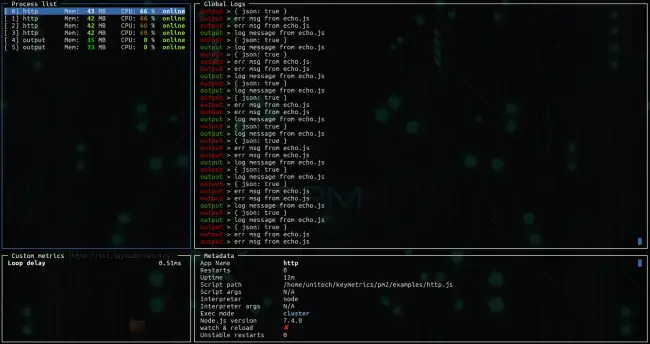
Additionally, PM2 automatically manages logs:
~/.pm2/logs/app-out.log: Standard logs~/.pm2/logs/app-error.log: Error logs
Some commands
View real-time logs
pm2 logs
Flush logs
pm2 flush
Specific app logs
pm2 logs app-name
Advanced Configuration with Ecosystem Files
For more complex configurations, PM2 supports configuration files (ecosystem.config.js):
module.exports = {
  apps: [{
    name: "api",
    script: "./src/index.js",
    instances: 2,
    exec_mode: "cluster",
    env: {
      PORT: 3000,
      NODE_ENV: "development"
    },
    env_production: {
      PORT: 80,
      NODE_ENV: "production"
    }
  }]
}
instances: Number of instances (can be a number or “max” to use all CPUs)exec_mode: “cluster” or “fork”env: Environment variableswatch: Automatically restart on detecting changeserror_fileandout_file: Paths for logs