
ResXResourceManager is a tool for managing .resx resource files in .NET applications.
This library facilitates the localization and globalization of applications by providing an intuitive interface for handling text strings and other resources that need to be translated into multiple languages.
- Intuitive user interface: Offers an easy-to-use graphical interface for managing .resx files.
- Support for multiple languages: Facilitates adding and editing translations for multiple languages.
- Integration with Visual Studio: Integrates seamlessly with Visual Studio, allowing efficient resource management directly from the development environment.
- Detection of unused resources: Identifies and helps remove resources that are not being used in the code.
- Import and export: Allows importing and exporting resources to and from CSV files to facilitate work with translators.
For more information, detailed documentation, and access to the source code, visit the project repository on GitHub - ResXResourceManager.
Installing ResXResourceManager
To start using ResXResourceManager, you can install it as a Visual Studio extension or use it as a standalone tool. To install it as a Visual Studio extension, follow these steps:
- Open Visual Studio.
- Navigate to
Extensions>Manage Extensions. - Search for “ResX Resource Manager”.
- Click
Downloadand follow the instructions to complete the installation.
Using ResXResourceManager
Creating and managing resources
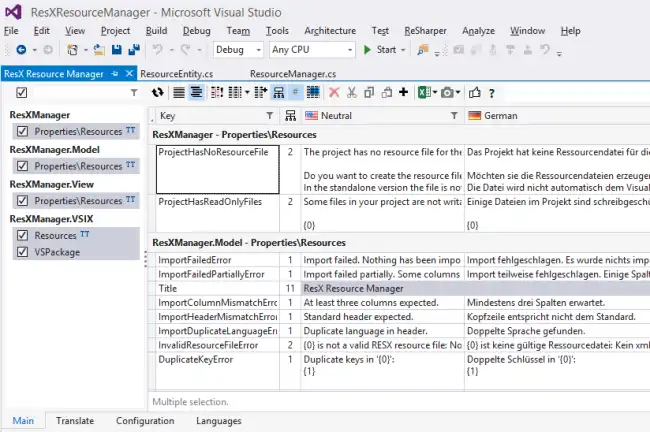
To start using ResXResourceManager, open the tool from the Tools menu in Visual Studio. Then, open a project containing .resx files. ResXResourceManager will automatically scan the project and display all available resources.
From this window, you can easily add or edit resources in different languages.
Importing and exporting resources
To facilitate collaboration with translators, ResXResourceManager allows importing and exporting resources to and from CSV files.
Example of usage in C# code
Once resources have been managed with ResXResourceManager, they can be used in C# code as follows:
Defining resources in .resx
Imagine we have a resource file Resources.resx with the following keys and values:
Greeting:Hello, World!(in English)Greeting:Hola, Mundo!(in Spanish)
Using resources in code
To use these resources in your application, you can do the following:
using System;
using System.Globalization;
using System.Threading;
using System.Resources;

class Program
{
    static void Main()
    {
        // Set the language to Spanish
        Thread.CurrentThread.CurrentUICulture = new CultureInfo("es");

        // Load the resource file
        ResourceManager rm = new ResourceManager("Namespace.Resources", typeof(Program).Assembly);

        // Get the resource value
        string greeting = rm.GetString("Greeting");

        Console.WriteLine(greeting); // Output: Hola, Mundo!
    }
}
In this example, we change the user interface language to Spanish (es) and load the Greeting resource from the Resources.resx file.
Detecting unused resources
To keep the project clean and avoid including unnecessary resources, ResXResourceManager can detect resources that are not being used in the code.
- Open ResXResourceManager.
- Navigate to the
Unusedtab. - Review the list of unused resources.
- Delete unnecessary resources as needed.